How to Create Effective Agent Skills
Written by
Juan Michelini, Graham Neubig
Published on
Software engineering can be a lot of fun—solving creative challenges, coming up with new designs, and turning them into working software that delights you or your users. But at the same time there is a lot of toil: repetitive tasks that you need to do over and over again to make sure that your software works properly. These can be adding tests, doing code reviewing, upgrading out of date libraries, etc. One of the most promising uses of coding agents is to get rid of that toil, automating away your repetitive tasks so you can focus on the fun stuff.
Another characteristic of the repetitive stuff is that often there's a fixed procedure you need to follow. For example, your org may have a particular way of doing reviews, or particular test coverage metrics that you need to achieve, or certain CVE scanners that need to be happy. When automating things with agents, we'd also like to have them follow these procedures.
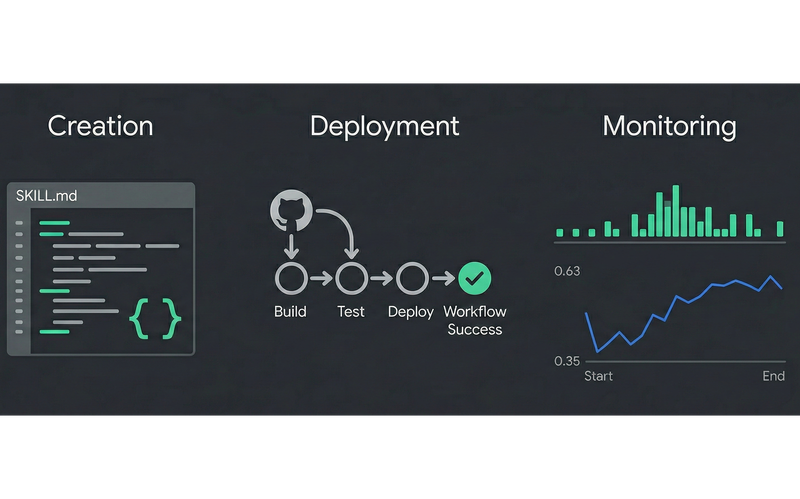
In this post, we'll introduce a way to get agents to follow these procedures: agent skills. Skills are specialised knowledge packages that extend coding agents like OpenHands with domain-specific expertise, making your agent able to follow your preferred workflows, making agents more capable while eliminating repetitive prompting. If you find yourself typing similar instructions across conversations, it's time to create a skill.
When to Create Skills
Skills are most useful when you want to do something that you need to do over and over again according to a fixed spec. If you're using a coding agent, this might mean that you're repeating the same prompt over and over again when you do a task, like the following code formatting rules that you add with every PR:
Please check this Python code using:
- Black formatting with 88-char line limit
- Ruff linting with our custom rules
- Type hints for all public APIs
- Google-style docstrings
- Pytest for all new functions
...
This works once. But when you're doing your tenth PR of the week, copying and pasting style guidelines gets old fast. More importantly, it's error-prone: miss a detail, and you get inconsistent results.
What is a Skill?
A skill is a package of prompts, scripts, and resources that converts your repetitive tasks into a fixed workflow that can be used over and over again. Specifically, skills are now standardized using the AgentSkills standard to include files in the following format:
my-skill/
├── SKILL.md          # Required: instructions + metadata
├── scripts/          # Optional: executable code
├── references/       # Optional: documentation
└── assets/           # Optional: templates, resources
The most central part of this is SKILL.md, which contains: 1) metadata with name, description and triggers, 2) markdown with instructions on how to carry out the task, and 3) optional references to scripts and other files.
Notice that the only metadata is loaded every time, while the full skill is only loaded to the context when it is triggered. This is called "progressive disclosure," and is useful for keeping the agent's context clean of skills not related to the problem at hand. Keeping context small improves quality and reduces costs.
Here is an example of what a SKILL.md file might look like for the Python review workflow specified above:
---
name: python-review
description: This skill should be used when the user asks to "review Python code", "check Python style", "lint Python", or mentions code quality.
triggers:
- python review
- code review
- lint python
---

# Python Code Review

Review Python code using company standards...
[Your complete workflow here]
You can then put this file in the .agents directory of whatever repo you're working on. Then, whenever you say "review this Python code," the agent will know to load your complete workflow and follow it.
Real-World Examples
At OpenHands, we maintain an extensions repository of high quality agent skills, which are also largely available by default when you use the agent. These include information about using tools like Azure DevOps, Bitbucket, Discord, GitHub, GitLab, Datadog, Deno, Docker, the OpenHands API, and Vercel, plus workflows for PR code review (and a roasted variant), frontend design, repo onboarding, repo readiness reports, release notes, security, and creating new skills, among others. Sometimes it's best to learn by example, so feel free to dig in.
Creating a New Skill
Our recommended way to create new skills is to not do it completely from scratch, but rather do it when you notice that you have just finished a workflow that you would like to automate in the future. This way, the agent already has context about what a good example of the workflow looks like and can apply that example to create a new skill with the details that are necessary.
We have made this easy in OpenHands with our skill-creator skill that guides you through an interactive process, asking questions about your requirements and suggesting the right structure. So when using OpenHands, if you have just finished a workflow you can ask:
/skill-creator Create a skill for automating this workflow in the future.
And the agent will gather the necessary context. The resulting skill can then be added to the appropriate place in the .openhands/skills or .agents/skills directory of your repo.
Once you have done this, it's also good to test the skill a few times to see if it generally works as expected by spinning up an agent and getting it to work.
Deploying Skills to your Team
Once you've created effective skills, share them with your team. Skills can be:
-
Added directly to your repository (
.agents/skills/directory), as mentioned above. -
Shared via GitHub (other teams can use
/add-skill https://github.com/yourorg/repo) -
Published to the OpenHands Extensions registry
When your whole team uses the same skills, you get consistency across code reviews, implementations, and standards enforcement.
One of our other favorite ways to deploy skills in repetitive workflows is through automations in your favorite software, such as GitHub CI. We have examples of automations for several skills in the plugins section of the OpenHands Extensions repo (plugins are a set of multiple skills together with other conveniences like GitHub workflows). In particular, one of our favorite skills to be used in this way is our pull request review pipeline, which we apply every time a pull request becomes "ready for review" on one of our repos.
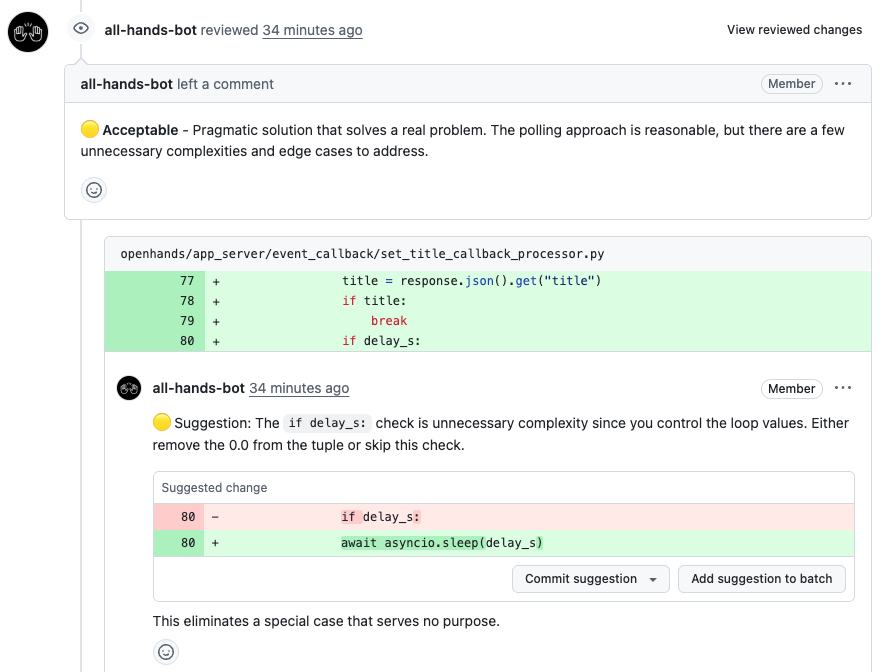
Monitoring and Improving Skills
Now comes the harder part. You have created a skill that codifies one of your workflows, and started using it. Now how do you know whether that skill is working properly in production? To ensure this, we use a four-part process of:
-
Logging the agent's behavior on each skill usage
-
Evaluating the agent's performance for each skill usage
-
Dashboarding the evaluation scores
-
Aggregating this feedback and suggesting improvements to the skill
Let's take an example of how we do this in production with our PR review skill.
Logging Agent Behavior
The first step to monitoring is logging, and OpenHands is instrumented with OpenTelemetry compatible hooks, provided by the open-source Laminar library. So if you want to save the agent's behavior while it executes the skill, you can choose your favorite OpenTelemetry-compatible monitoring solution, and save the files.
For instance, to show an example with laminar.sh as a host for logging traces, we can set an API key in LMNR_PROJECT_API_KEY, and the logs for each run will be saved in a format like below for perusal and analysis by you, the skill creator. You can see what the agent did, where it fumbled, etc. and make adjustments:
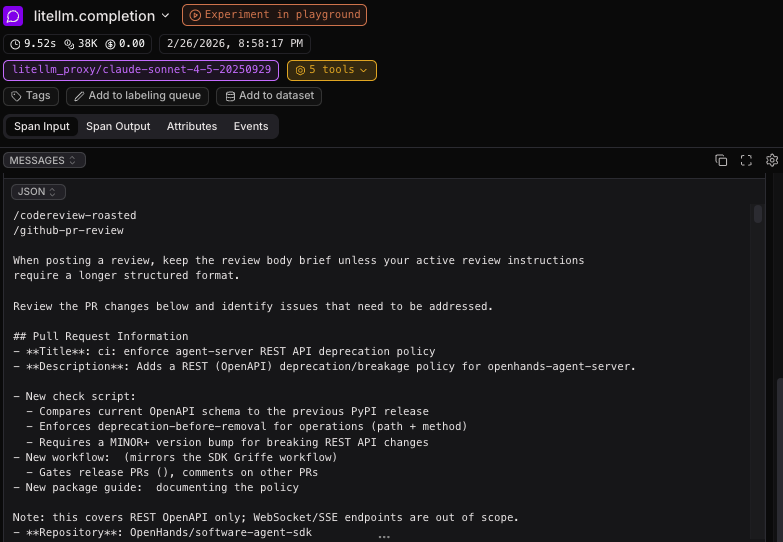
To see how this is done in more detail, you can take a look at the PR review github action, where this key is specified.
When this is working, you should see a steady stream of logged data flowing into your monitoring system. This is the first step towards improvement.

Automatically Evaluating Agent Performance
This gives you a look into how the agent acts on each particular input, but looking through piles and piles of agent traces can be a lot of work. To easily get a good quantitative look at how to judge agent performance, you can also set up an automatic evaluation pipeline. The best way to do this is to look at the behavior of human developers who interacted with the agent's output in some way, which gives you a signal of whether the agent did a good job or a bad job.
In the case of PR review, one good signal we can get is whether the agents' review suggestions were actually incorporated by the human developers. Based on this, we can calculate the percentage of suggestions that were actually reflected, giving an idea of the relative proportion of good suggestions:
suggestion_accuracy = ai_suggestions_reflected / ai_suggestions
To do this, we add another GitHub CI action specifically for evaluation after the PR is merged into the codebase. This action reflects all of the human comments that were made on the PR and also the final patch that was accepted. You can find an example of this action here.
Once we have this data in the system, we can use a language model as a judge to evaluate how many AI suggestions were made and how many AI suggestions were reflected by feeding all of this information into a prompt. Here is an excerpt that we use in production for our PR review bot:
### ai_suggestions
Count items in `agent_comments` where the `body` contains an actionable code
suggestion (look for code blocks, "suggestion:", specific changes to make).
Do NOT count general praise or approval-only comments.

### ai_suggestions_reflected
Count suggestions that were incorporated. A suggestion is "reflected" if EITHER:
1. There exists a `human_responses` entry indicating that the suggestion was reflected
2. OR the suggestion is reflected in `final_diff`
Another useful thing that you can record for later is an analysis of the things the agent did right or wrong:
## Analysis

Additionally perform an analysis based on the agent trajectory and final results,
introspecting about what comments were good, what comments were unnecessary,
and what things the agent could've commented about but missed.
Dashboarding Evaluation Scores
Once you have the data in your system, you can start dashboarding. We use the laminar.sh dashboard functionality, and create a SQL query that pulls out the AI suggestions and AI suggestions reflected over time, to calculate the accuracy of the AI comments. Here is our graph of PR review accuracy over time—it's going up and to the right, which is a good sign:
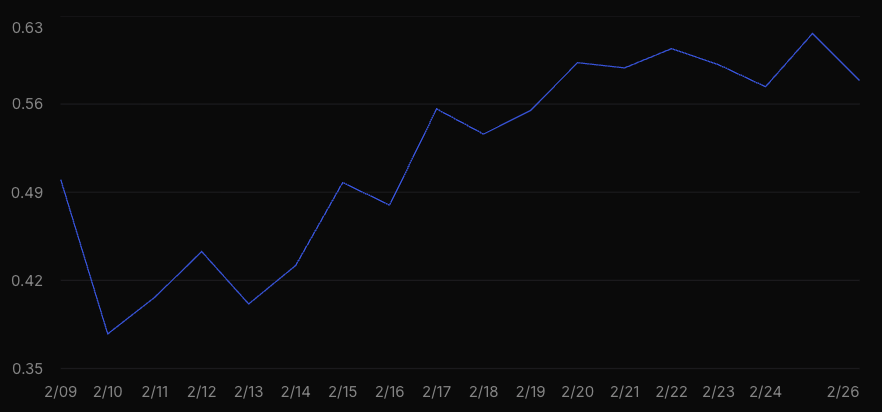
This also opens up interesting possibilities: you can monitor how well skills are working on different repos, or you can A/B test different prompts and different language models.
Aggregating Feedback for Skill Improvement
One of the most powerful tools for skill improvement is to use language models themselves to aggregate feedback to improve your skills. We have an example script that pulls:
-
The current version of the prompt
-
All of the free-text analyses of agent behavior that we have aggregated over past runs
We can then throw all of these into a reasoning model with long context (we used Gemini-3-Pro, but any one with a long context window and strong reasoning should do) and ask it for suggestions. Here are an example of some of the issues it suggested for our review bot, along with examples:
### 1. [MEDIUM] Context-Unaware 'Best Practice' Suggestions

The agent frequently suggests changes that are technically correct but practically
rejected because they conflict with the repository's established testing philosophy
or internal maintenance practices. For example, suggesting 'real' integration tests
when the repo uses mocks, or suggesting version pinning when the maintainers prefer
latest versions for internal tooling. This creates noise and reduces trust.

**Frequency:** Frequent (approx 15% of traces with suggestions)

### 2. [HIGH] Premature Approval of Flawed PRs

The agent often identifies a critical issue (e.g., treating a symptom instead of
a root cause, infinite loop risks, or security flaws) but effectively 'rubber stamps'
the PR with an APPROVE verdict instead of requesting changes or blocking. This sends
a mixed signal: 'Here is a critical flaw, but go ahead and merge.'

**Frequency:** Occasional (approx 10% of traces)
And some of the suggested improvements:
### 1. [HIGH PRIORITY] Enforce Blocking Reviews for Critical Issues

Modify the 'VERDICT' section in the `codereview-roasted` skill to explicitly
forbid approval when critical issues are found.

**Suggested Prompt Changes:**

- **VERDICT:**
✅ **APPROVE**: Only if the core logic is sound, secure, and solves the problem.
❌ **REQUEST CHANGES**: You MUST use this if you find:
  1. Security vulnerabilities (SQLi, XSS, bypasses)
  2. Race conditions or concurrency bugs
  3. Infinite loops or resource leaks
  4. Missing tests for NEW behavior
  5. Logic that treats symptoms instead of root causes
DO NOT approve a PR that has any of the above issues.

### 2. [MEDIUM PRIORITY] Add Mandatory Context & Verification Step

Add a 'Verification' step to the `CRITICAL ANALYSIS FRAMEWORK` in the skill.
This forces the agent to check if a suggestion matches existing patterns or
if a 'missing' file actually exists before posting.

**Suggested Prompt Changes:**

7. **Context & Verification** (Mandatory)
Before posting a suggestion:
- **Check Consistency**: Does the repo already use the pattern you're criticizing?
- **Verify Existence**: If you claim a file/module is missing, use `ls` or `grep`
  to prove it doesn't exist elsewhere.
- **Check Constraints**: Are you suggesting pinning a version in a repo that
  explicitly prefers latest versions for internal tooling?
You can find the whole script to do this analysis here.
And once you apply these suggestions, you can monitor the improvement in metrics, do A/B tests with before/after prompts, etc.
Next Steps
Hopefully this gave a good overview of what agent skills are, why they are useful, how to deploy them, and most importantly how to build effective ones that you can use and monitor in production. As you'll notice, most of the code here is available open source, so it should be easy for you to start to play with and use in your own workflows as well. We welcome improvements and PRs back to the original repos of course.
And if you're a development team that is serious about getting the workflows working in production, please reach out to the OpenHands team—we'd love to help! You can contact us through our contact form or hop on our Slack in the #proj-extensions channel to learn more.
Resources
-
Skills Documentation - Comprehensive guide with detailed best practices
-
Official OpenHands Extensions Registry - Browse community-created skills for inspiration
-
Plugins Documentation - When you're ready to bundle multiple components
Acknowledgements
We'd like to thank Robert Kim and the laminar.sh team for their support in setting up monitoring in Laminar for this blog!


Get useful insights in our blog
Insights and updates from the OpenHands team
Sign up for our newsletter for updates, events, and community insights.
OpenHands is the foundation for secure, transparent, model-agnostic coding agents - empowering every software team to build faster with full control.



