Agents in the Outer Loop
Written by
Robert Brennan
Published on
Most developers using AI are using it to accelerate the inner loop of development. They're using an AI-powered IDE or a CLI agent, running locally on their laptop. As they make progress, tweaking the code and checking the results, the AI helps them go a bit faster.
On the other hand, there's an emerging paradigm of cloud-based agents that shine in the outer loop. Devs invoke agents from Slack, Jira, and GitHub to take on entire tasks, without ever having to open their IDE.
In this blog I'll describe a bit about this emerging paradigm, and argue that the most effective developers and development teams will be using both.
Inner and Outer Loops
The terms for inner and outer loops of development emerged in the late 2010s, as developers reoriented around containers and cloud native applications.
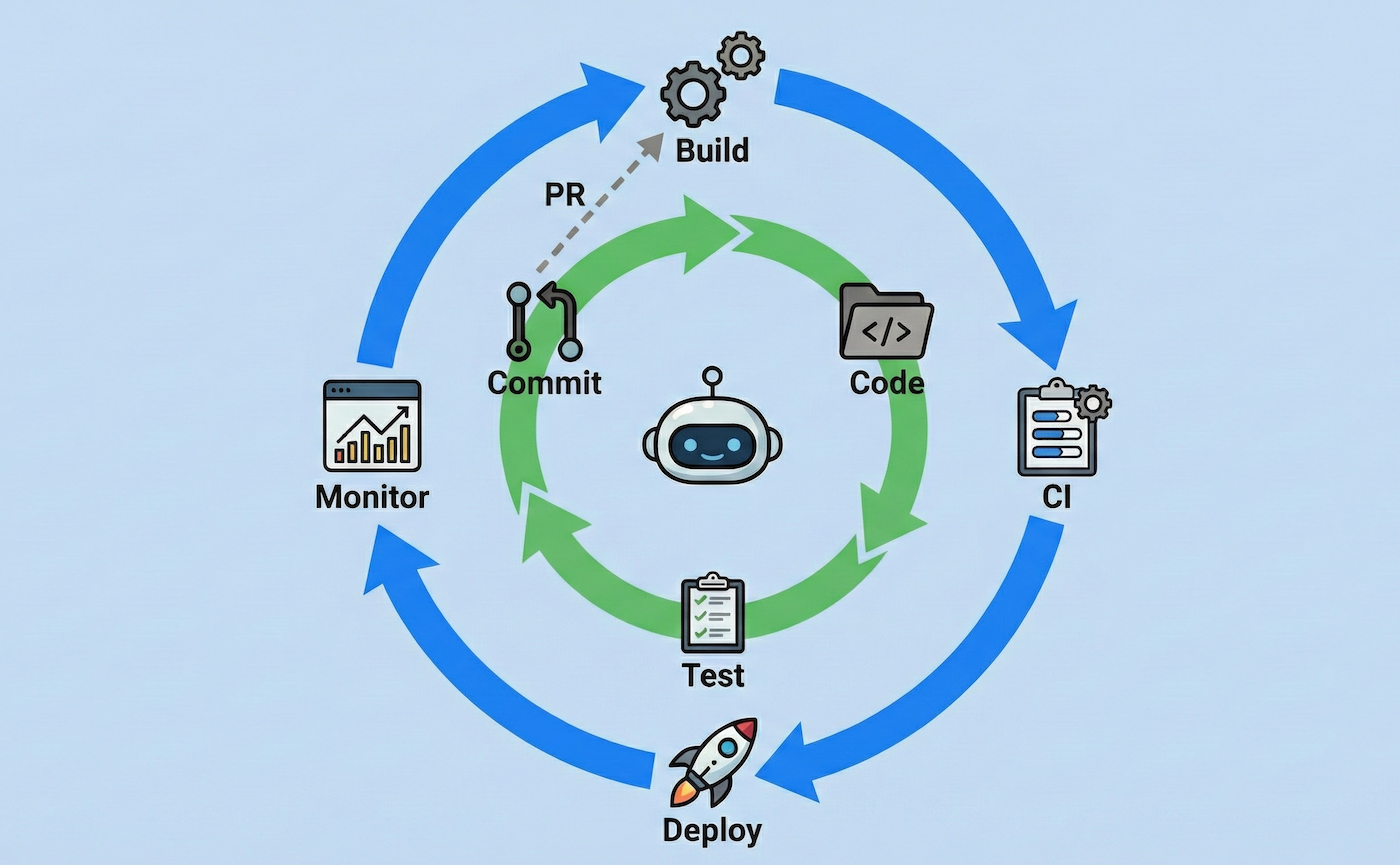
The inner loop is what you probably think of when you think about coding. Make a small change to the code, then see if it works by loading the app or running the tests; rinse and repeat until you're happy with your changes. The inner loop takes place entirely on your laptop, usually without anyone else involved.
The outer loop kicks in after you git push. This is where your team's tooling kicks into gear: CI/CD pipelines, code review, issue tracking, etc. The outer loop happens in the cloud, and is also where your teammates start to get involved.
Typically in the inner loop, you get to bring your own tooling: you can use whatever IDEs, CLIs, etc you want. I'm a neovim user, but my teammates have their own preferences like VS Code, Zed, or Cursor—fortunately in the inner loop it doesn't matter if we're using different tools.
In the outer loop, the team needs to settle on tooling together. It wouldn't make any sense for me to use Jira while you use Linear! Or for me to use GitHub while you use GitLab. The outer loop is where we collaborate.
Inner Loop Agents
So far, AI has mostly entered the inner loop of development. Developers are running agents inside their IDE or as a CLI.
The agent can take over most of the rote work of actually writing lines of code, while the developer thinks more deeply about the particular problem they're working on. The agent serves as an assistant, a pair programmer helping the developer move faster through the inner loop.
This does seem to lift productivity a bit. According to research studies developers can see something like a 40-50% productivity gain in implementation (sources: 1, 2), although often at the cost of increased debugging time (source). But using agents is also a practicable skill! Agents are tricky, but once you get a feel for where they work well and where they fall down, having an agent coding with you feels like wearing a jetpack.
The gains here are incremental though. The developer is still actively focused on the task at hand; the AI is just helping them go a bit faster. It's a far cry from the "fully autonomous AI developer" we were promised!
Outer Loop Agents
Increasingly, devs are starting to figure out how to run agents in the outer loop.
In the outer loop, agents run on their own infrastructure, instead of on your laptop. They might run inside of a GitHub Action, a Kubernetes pod, or on a service like OpenHands Cloud. They get their own filesystem, their own terminal, their own web browser, and their own copy of your codebase.
There are two major implications here: safety and scalability.
Safety
When you run a local agent, there's nothing stopping it from running rm -rf / or exfiltrating your AWS credentials. That's why local agents have an option to repeatedly ask you to hit the y key to confirm their next action—you need to babysit them to be sure they don't do anything harmful.
When the agent runs in its own infrastructure, the blast radius is much smaller. The agent only has access to the tools and credentials you explicitly connect. You can let it run unsupervised with greater confidence (so long as you're not adding things like AWS keys of your root account into the environment!)
When agents run in the outer loop, developers typically let them run completely autonomously, without babysitting and approving every individual action.
Scalability
Running in the cloud also offers far more scalability than running local agents.
Sure, you can run a few different agents at the same time locally. But with each agent, you increase the chances that they'll try to edit the same file, or run commands that compete for resources. And of course, you'll also need to watch them and approve their actions. Most developers hit a limit at around 2-3 local agents.
In the cloud, we can scale to dozens—even thousands!—of agents without breaking a sweat. Each one gets its own workstation, its own memory and CPU. Things might get expensive, but in the cloud there's nothing stopping us from spinning up another VM or container for our agent to work in.
The big question is: what can we do with 1000s of agents?
Tech Debt and Toil
Most developers want to spend their time shipping features. Sure, some of us really love a good refactor, or tuning the logs, or updating old dependencies. But what gets us excited (and promoted) is shipping new value to end users.
But every large codebase sits on a mountain of tech debt. Dependencies rot and go out of support. Decisions made last year no longer make sense. New open source vulnerabilities get announced, leaving you exposed to attack. Some teams spend a majority of their time just keeping the lights on.
Fortunately this work is often easy to automate! Even before LLMs, we got used to services like Dependabot upgrading dependencies for us, automatically putting up PRs for review. And with LLMs, the scope of work we can address with automation increases by an order of magnitude.
Example: CVE Remediation
A great example here is CVE (Common Vulnerability/Exposure) remediation. Every day, new open source vulnerabilities are announced. Every team has a backlog of tens to thousands of known vulnerabilities in their codebase, which often languishes until someone from the security team complains.
The process of remediating CVEs is a pain. You need to figure out where the vuln is coming from, and what exactly needs to be updated (package.json? A Dockerfile? something else?). Worse, the update might include breaking changes, forcing you to modify your codebase as well. Finally, you need to ensure everything works and that the CVE has indeed been resolved.
But it's a very rote process, so agents are a great fit for CVE resolution!
Now, you could do this with inner loop agents. You could assign each CVE to a developer, and have that developer work with an agent locally to fix the CVE. That'd be closest to how we're used to working.
But what if you kicked off an outer loop agent immediately after the CVE was announced? The agent can run completely on its own, researching, resolving, and verifying a fix. And it can automatically open up a pull request for the team to review, without needing a human supervisor.
This is much closer to how pre-AI automation like Dependabot work. PRs magically appear, and the devs just have to spot-check and merge it.
And yes—for the largest companies working with OpenHands, this often does imply running 100s or 1000s of concurrent agents when a new CVE is announced—you need one for each affected repo!
See more details in our blog on the topic.
Example: Error Log Resolution
A great target for any team is to get to zero error logs in production. Info and warning logs are helpful; error logs are a sign something is going wrong.
We've helped some teams enact this by setting up OpenHands to scan their Datadog logs for new error patterns. The agent then follows a workflow to figure out which repository is triggering the error, and finds the right part of the codebase. It can then fix the problem, add better error handling, or downgrade the log to a warning.
So even if the error occurs at 3am, the team wakes up to a proposed fix the next morning!
This is a great example of the sort of toil that slowly builds, with no clear owner. But thoughtful use of agents can help developers keep their production deployments clean and healthy without taking energy from the team.
We have more details on this one in a blog as well.
You Can Have Both
We're finding that there's a place for agents in both the inner loop and the outer loop.
Inner loop agents are great for ad hoc work: if you've got a new feature to implement, or a tricky bug you're trying to uncover, you'll probably work best inside an IDE—but having an agent there with you to take on smaller bits of the task can be a great lift.
Outer loop agents are great for repeatable work: if you're toiling away at the same annoying chores, you can probably craft a prompt that will drive an agent through the same process. This is a great way to keep your maintenance backlog at bay.
You might want to use the same solution for both (OpenHands provides both a CLI for the inner loop, and an SDK for the outer loop). But more likely, you'll want to let each dev on your team choose their own inner loop tooling, and standardize on a single solution for the outer loop.
Just make sure you're not sleeping on the outer loop!



Get useful insights in our blog
Insights and updates from the OpenHands team
Sign up for our newsletter for updates, events, and community insights.
OpenHands is the foundation for secure, transparent, model-agnostic coding agents - empowering every software team to build faster with full control.



